Ataccama Reference Data Manager is a tool for managing reference data by supporting formal, defined processes and ensuring central authority over all reference data changes. Reference Data Manager allows not only browsing all reference data, but also changing, creating, and deleting existing data. Its domain-agnostic nature also ensures flexibility to adapt to all types of industries, and its cutting-edge user interface with the latest standards and technology on Ul and UX make an easy-to-use product for data managers.
Ataccama Reference Data Manager is used both as a stand-alone fully featured solution for the purpose of managing reference data and in combination with other products for a bigger solution. (e.g., Ataccama Master Data Management). Like the rest of the Ataccama platform, RDM excels in integrating with other systems and applications via standard interfaces in various modes.
Business Role e Provide means for reference data management operations, including a process of validation. • Easily configurable workflow for business approval processes. • Synchronization processes across systems, maintaining consistency of the reference data. • Browse reference data, through hierarchies, views or entity tables, supported by filtering and other advanced navigation features. • Historical traceability and auditing of data over time. Business Cases • Managing all reference data across a diverse range of source systems. • Providing a central authority for reference data editing (e.g., creation, modification, etc.), supported by configurable workflows for a business approval process • Providing consistent reference data to consuming systems and synchronization with other different reference data sources. • Providing an easy-to-use application to search and display reference data as required.
Why is Data Quality aspect important and how it can affect the efficiency of RDM solution: • Low DQ data can never be used efficiently • Categorizing and structuring the data allows its better management e DQ issues might identified and resolved before entering the MDM systems
In order to work with any data, it is essential to: • Know the location Of the data, have it available for access and read them properly without restrictions • Be able to follow the data structure, understand the data relationships and have it ready for processing • Collaborate over data value curation or any potential data issues on metadata level • Provide reliable data to be evaluated, detect anomalies and report DQ results via dashboards or other reporting mechanisms • Apply data transformation, separate exceptions for manual remediation (issues) and be able to compare both curated and original data
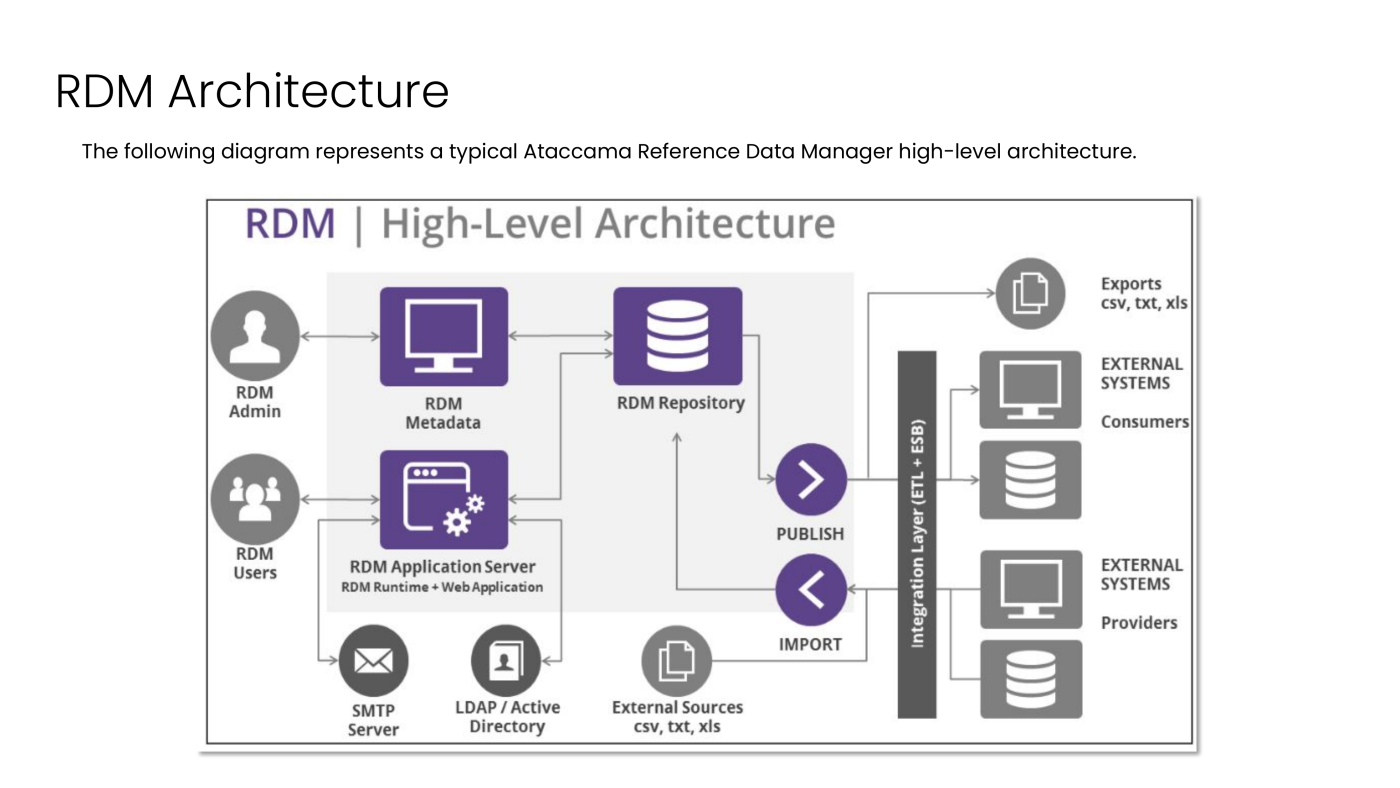
RDM Metadata • The RDM metadata is the core configuration of the RDM project. • Through the metadata model it defines all entities, structures, workflows, synchronization jobs, and more. RDM Application Server • Ataccama Reference Data Manager is a web application created on top of the Java technology. • As seen in the high-level architecture, users work directly with the RDM Web Application, which is connected to the RDM Database. • The Web Application is independent of the RDM Model Project, which is developed and packaged apart, and its configuration is loaded directly into the client.
RDM Repository • The RDM database repository contains model configuration, physical structures created automatically based on this model and also reference data stored in these specific structures. Only the RDM web application and its processes can interact with the RDM repository, with no direct external access on data allowed as best practice. ONE Desktop Integration • There are two cases in which ONE Desktop Integration is used by the RDM application. • Both are optional and not required for the basic functions of the Reference Data Manager. Validation and Enrichment Services O Workflows , Interfaces and ,Synchronization Jobs O
Validation and Enrichment Services • Ataccama RDM can use services for validation and enrichment. • These services are usually created using ONE Desktop (as custom DQ services) since they follow some requirements in terms Of configuration. • If those services are used, integration with ONE Runtime Server is required. • This server hosts services that are provided to RDM and can be in the same machine or a remote machine. • The choice of server location is part of the metadata configuration of the project.
Workflows, Interfaces and, Synchronization Jobs • Ataccama RDM can synchronize its master reference data with other systems that have been defined as Connected Systems in the RDM Metadata. • The generated workflows as part Of the configuration, the schedules from the Task Scheduler, and plans created for the Export and Import interfaces are all hosted and executed by the ONE Runtime Server. • In order to take advantage of the exporting and importing features, both batch and online, integration with the ONE Runtime server is needed.